Showing posts with label Gizmos and Gadgets. Show all posts

Wednesday, December 7, 2016

The Magnificent Seven!

While a lot of my training is spent on the trainer those days that I do ride outside I have a short list of things I never leave home without. This goes beyond that basics of some cash, a phone and a spare tube. None of them are super expensive or technical but from a lot of experience I have found that they are all essential to have.

RoadID App; Well to use this you do need a phone. It’s provides a "follow me" e-breadcrumb trail that you send to someone so they know where you are. Over several iterations the functionality has improved but at its basic level it provide telephone based GPS accuracy on your location. It works every time.
Pedros Tire Lever; just one, you only need one. These simply are the best levers on the market. They do not break and they do not scratch. They come in nice bright colors although as a traditionalist I choose the old school Pedros yellow every time!
 
Pump; I have an older Lezyne Carbon Drive Mini Pump. It fits in my jersey pocket easily, can pump up to 90lbs and weighs just one pound. I particularly like the hose attachment (Presta and Schrader) this avoids snapping off your valve when you’re fumbling with fitting it on.
Fly 6 and Fly 12 Camera/Lights; I pretty much always rode with a red blinky and sometimes a white one so adding these to my list of Go-To items was a no brainer. I only got them in September but so far I love them and I recently backed their Kickstart Campaign for a dedicated Duo Mount which will mount the Fly 12 with my Garmin. With the uptick in accidents and deliberate aggressive motorist/cyclist interactions the ability to capture things on camera brings a welcome security blanket in case something untoward should happen. A longer post on these will follow.
 

aLoksaks; perfect for your change, phone, credit cards and other little bits, it keeps them secure and dry. I use the one that came free from Skratch Labs when I purchased a sticker pack from them. This has to be one of the best freebies out there!
Nitrile Gloves; keep your hands, gloves and kit clean. Seriously there are a penny a pair and have saved my kit several times on the roadside!
 
Lipstick charger and 3” iPhone cable; they weigh nothing and can really save you in a pinch. Just keep them together and charged and you’re good to go. Personally I use Anker products, I lucked onto them through Amazon and found them to be reliable and road tough. Yes, I have dropped it a couple of times!


So, what are your Magnificent Seven?

Wednesday, October 31, 2012

psst wanna buy some Oakley sunglasses?

Alternative titles “Shady Shades”, “Fakebook” or “Jokelys”!

Like a billion other people I have a Facebook account, I don’t use it that much, I was a fairly early adopter, my account was born October 2007, a mere 13 months after it was launched public wide…it seemed so quaint back then!

But I digress, as many of you are pretty internet savvy I am sure you have seen those Sponsored ads on the side of your Facebook feed and wondered “hmm really Oakleys for $29…scam…or not?!?!”.

image

Well I did too and now I have in my hand a pair of Oakley glasses! But first I did some homework…

I looked around the vendors website…looks legit right I highlighted the suspect things… I especially  like the Hotmail account, I mean who uses Hotmail these days!

image

image

Then I did a search for the “parent company”…again this all seems kosher!

image

image

Just to double check I did some research on the acquisition of Oakley, this seems like a bona fide claim!

image

So I had a look through their catalog and I hit the button and purchased a pair…through PayPal, I mean who else would a multi billion dollar company use for merchant services…no offence PayPal!

image

And lo and behold about 10 days later I got a box of genuine made in America Oakley Jawbones from…China!

I’ll be honest and say my expectations were pretty very low and they were met, trust me had these been real I would have been writing all about that! The quality is shocking and as anyone who has a pair of Jawbones knows they open to accommodate different lenses etc., these are solid framed, this is the real Oakley website

image

The list goes on and suffice to say they are not Oakley Sunglasses…YEAH SHOCKA!!!.

image

As a follow up I reached out to Facebook, Oakley, Luxottica and NPR’s Planet Money…I’ll keep you posted!

Tuesday, May 3, 2011

Review; Sony Walkman W Series MP3 Player

If you have ever seen a photo of me chances are I have earbuds stuck in my ears, I would like to think I am an audiophile but the truth is that I like to have a solid bass and no hiss! Yeah it’s not the safest thing to do but…well 2-3 hours doing anything needs some musical accompaniment. Up until a couple of years ago I was happy with the out-of-the-box Apple earbuds, then I discovered Sony Mdr-Ed12Lp, not the catchiest of names but these babies pack a punch and you can pick them up online for around $10, but there downside is that are susceptible to water, sweat, Cytomax; yeah I dropped an ear bud into an open handheld once! So when Sony hit me up to review there latest reincarnation of the Walkman I was in!

Now the truth is I am a bit late to the party on reviewing these; there are some actually pretty thorough reviews posted by other blogging buddies of mine including,

Frayed Laces; “Perhaps I just have abnormal ears

ChicRunner; “I love this little guy

Gretchen; “an excellent player for the gym or other low-impact sports

Aron; “I would definitely recommend this

P1010788 image

So I am going to spare you the basics about the features, suffice to say it goes forwards and backwards. There are some nice touches that have not been mentioned in other reviews:

  • It is iTunes compatible just drop and drag your music easy peasy, you can create playlists through new folders and then scroll through from the earset
  • It comes with three sizes of earbuds so you can get a good fit; they’re really easy to change and you can mix and match to get the best fit possible
  • The sound quality is really good, way better than the Apple buds and as good as my beloved Mdrs, deep rich bass and clear top notes
  • The magnetic touch turns them off so as long as you close them you can save the battery, they also charge up really quickly approx 80% in 5 minutes from flat
  • No cords, needless to say this is a total bonus
  • Water…well sweat proof, yeah it’s getting pretty toasty on my lunchtime runs, today hit 98f

Of course there are a couple of downsides:

  • Changing tracks on the fly is a bit tricky, you get used to it but it is a bit tricky!
  • The fit, this is one size fits all, kinda, the loop that wraps round you head is one size and ergo if you’re an XL or XS cranium you could have issues…I am erring on the XL side
  • One thing missing for those that run with a cell phone, these would be great if they were blue tooth compatible
  • The earbuds, well here’s the kicker they rubbed the inside of my ear and for me that’s the deal breaker

Now just because they do not work for me does not mean they won’t work for you and thanks to Sony I have two pairs to give away to two lucky readers…and listeners I suppose!

So by now you know the form right:

Show some Facebook love will get you an entry.

Post about it on your blog will get you another.

Tweet “I just entered the @quadrathon win a @SonyElectronics W Series Walkman competition you can too http://tinyurl.com/4352l6h” and you can have three.

Finally let me know how many you entries you need by leaving a comment on this post for your fourth and I will draw a winner on Friday! Otherwise you can have a rummage in the garage for your old cassette player!

Sunday, April 3, 2011

It doesn't not work!

I started wearing a Power Balance band last September or so. I had a twingery, you know one of those niggly things that just wouldn't go away, ice, rest, heat, stretching, massage nothing would make my adductors feel better, so I thought what the hell and I plonked down my cash...well to confess I got it on Amazon and paid less than $10.00 for it, that's something like a 60% discount.

With two marathons on my short term radar I was pretty desperate to find something that would help.

It arrived, I put it on, I ran two marathons and then a half and you know what I had no problems from my ads, nada, zip, zero!

Was it the super duper magnetic powers I brandished locked in a rubber bracelet, had I discovered the Omnitrix; could I become the next Ben10...do I look like a fool (ok don't answer that!) the better question is am superstitious well I am still wearing it, right! And I am sure you might be too!

Like I said it doesn't not work and as long as it keeps doing that I'll keep wearing it!

Posted from Blogium for iPhone

Wednesday, November 25, 2009

Let you legs do the legwork (Pt 1)…

…and let your Garmin do the headwork, or put another way how to program your Garmin 305 with Intervals. As mentioned in a previous post this training cycle I am using the FIRST plan which calls for a Short Tempo, Long Tempo runs and Intervals. Programming your Garmin reduces the room for error i.e. forgetting how many you have done etc (been there done that!). I am assuming this will work with a 205, 405 and 310xt as I am using Garmin Training Center to create the workout. And so on with the show.

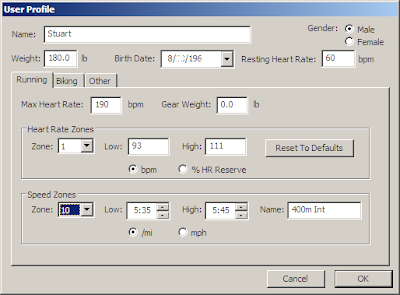
First you need to make sure you have the right pace zones in your profile, to do this Select User>Profile. Here you can confirm all your personal stats are correct etc. You need to adjust the settings in the Speed Zones, to calculate the setting you should use a Pace Calculator; the one at Cool Running is easy enough to use.


The First Plan gives you a HXX:MYY setting for the intervals so using the calculator convert this to a pace, mine is 5:40 for the 400 meter (that equals a 1:25 @400) intervals. My interval sets call for a Rest Interval (RI) so I also created a slower set; between 10-11:00 pace (2:40 @400m).


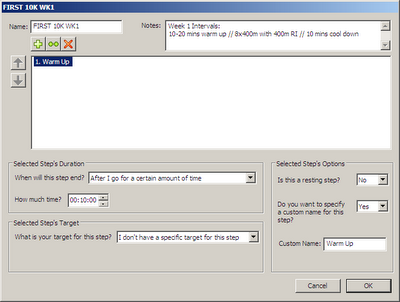
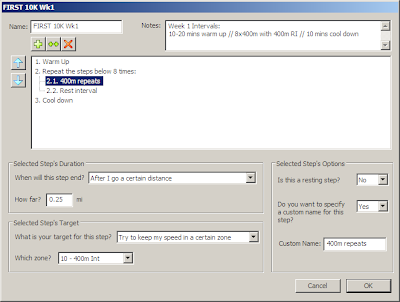
Once you changed the Speed Zones settings in GTC select New Workout. Here you are presented the blank template in which to create your workout. First name the workout and enter a description. I tend to use the obvious. Next select the first entry in the window, then in ‘Selected Steps Options’ give it a Custom Name; mine is ‘Warm Up’. Click the ‘When will the step end’ menu and select ‘after a certain time, then mark off you time; 10 minutes in my case.


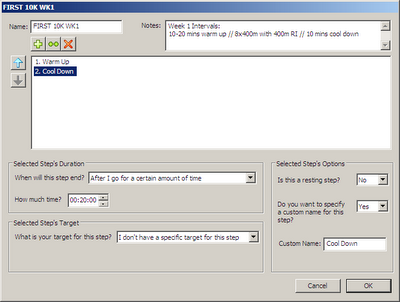
Highlight the ‘Warm Up and click the big ‘+’ button to get the next step and name that one; mine is ‘Cool down’ repeat the above steps to enter the duration.


Ok this is where it can get a bit confusing so I have numbered the steps:

1. Highlight the Warm Up and click the two “++” button, this insert Step 2 and renumbers your Cool Down to #3.
2. Rename the interval, mine is 400m Int
3. Click the big ‘+’ button to get the next step and name that one; mine is ‘RI’
4. Highlight #2. and change the number of intervals to what you want; for me it’s 8
5. Highlight #2.1 and click the ‘When will the step end’ menu and select ‘after a certain distance, then mark off you distance I selected 0.25 miles (FYI 1 mile = 1,609 meters).
6. Click the ‘What is your target for this step” and select your Interval target
7. Repeat steps 5 and 6 for #2.2 remember to select your Rest Interval
8. Click ok


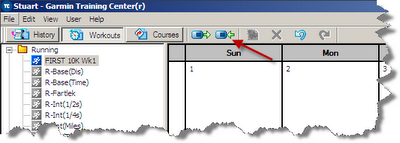
Now in the workout file structure in the left panel you will see your newly created workout, simply highlight it and drag it to the desired day. The final step is to connect your Garmin and sync. Once the connection is established click “Send to Device’, and you’re done…well, you still have to run them!


Up next; “Intervals; they’re on my Garmin somewhere…now what”?

Friday, August 21, 2009

Racevine; Zagat for Raceday!

I first came across Racevine via Twitter, the premise is simple, you run a race you love (or hate) you write a review, you want to run a race you read the reviews, think of it as Zagat or Expedia or even Amazon for you Sunday morning adventures. Do you want to know where the secret potta-john is, which race has the best SWAG (Stuff We Always Get) or which race never-ever to attend; this could be the place to look; such is the beauty of actual user commentary. In its early stages with more races to be reviewed than are reviewed this will be a great addition to your favorites toolbar especially if you’re planning on going on a destination race and could be investing a lot of money into your trip and race entry.

Registration is easy as is the actual reviewing, you can write as much as you like and then there are 10 or so consistent factors that you rate i.e. refreshments, SWAG, spectator support etc and voila that’s it. You can also search by zip, city and/or distance. Currently focused on 5k through to Marathon and on Triathalons (and only within the US) I have been told that ultra events will and are being added.

Check it out at RaceVine and if you register, and review a race you’ll be entered into their current competition where you could win race day entries, some new running clothes, race fuel and a whole bunch of other stuff.

Saturday, August 15, 2009

Getting the Tweet for the KT on the ITB!

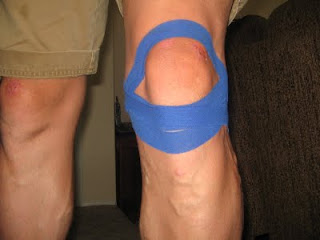
Alternative title; A Handful of Halfs! Neither of which are great but it’s been a long week! So after last Sunday’s disappointing run I took Monday off and iced, stretched and rolled my legs. Tuesday I hit the streets on my bike for a reasonably easy 30 mile ride, later in the day while on Twitter I saw a post referring to KT Tape, I followed the post, checked out who they are and before I knew it I was in Sports Authority purchasing two rolls, what the hell I thought! I tweeted thm on Twitter and they sent me instructions on how to tape my ITB by email.

I’ve taped in the past on the suggestion of my physio therapist but with medical bandage and not with sports specific tape. Wednesday morning I was on the West side of LA (by the beaches) and I had thrown my running kit in the car to see if the tape would hold up; that is prevent the pain. I followed the instructions in the box and actually taped for Runners Knee not ITB and set off, a little over two hours later I was back with 14.5 miles on my Forerunner and no pain…ok I thought, let’s see;

* Thursday 13 miles in 1:59, pain free; felt a bit tired and under fueled
* Friday 13.1 miles in 1:46, pain free; felt great and just enjoyed the run
* Saturday 13.1 miles in 1:56, pain free; another good run, deliberately at a slower pace

That’s 54 miles in 4 days and a smidge over 74 miles for the week, my second highest week ever! OK so now I am convinced!

The tape is really easy to apply although guys may want to consider getting the razor out for a cleaner “sticking” area. The packaging says it will last up to 5 days; mine is pretty shot after 4 days (6 showers, 8 foam rolling sessions and 6 stretching sessions) it comes in four colors and more are on the way and it’s pre-measured so you don’t need scissors. They have videos on their website on how to apply it and oh yeah and it looks pretty cool as well!

Quite possibly the cheapest thing you may ever buy for running at $12.99 a roll you can get it from Sports Authority or click on the Amazon Widget to the right, below my race reports and order yourself some!!

Wednesday, July 15, 2009

I'm a Mac, I'm a PC, I'm a Runner!

If you’ve been following my blog for a while you’ll probably know that I am a bit of a tech junkie, however since joining the ranks of “self employed” my habit has had to been curtailed due to a lack of Benjamins. Having had to migrate my mobile computing, in fact all of my computing onto an Mac after the untimely demise of my PC lap and desk tops, I had to suffer the foibles of Garmin Training Centre on the Mac, which is to be frank…crap!

You may have noticed that at the end of most of my “long” runs or rides I embedded the “ViewPort” data which was generated from MotionBased. MotionBased was an add-on provided by Garmin as either a limited free or more bells and whistles subscribed service. I’ll save you a long description of it as, as of June 30th it was retired. In its place Garmin provide Garmin Connect (GC). GC was originally introduced with the 405 and 50 models of the Forerunner and since then has been expanded to support all of the Garmin Fitness Models (Forerunner Models; 50, 201, 301, 205, 305, 310, 405, 405CX and Edge Models 205, 305, 605 and 705), which was completed in May.

Uploading to GC is easy and you simply hook up your device to your pc via the cradle and USB cable and go to their website register/log in and follow the instructions, I found it easier to just upload everything and then sift through it at a later date. GC boasts some pretty cool features, the nicest of which is the Player which provides a stride by stride (well not quite) analysis of your run (or bike).

As you would expect there are a raft of features that are designed to attract the novice athlete through to the more hardened. There are, however, some things missing that I liked in MotionBased; Moving Time vs. Total Time, Weather, Wind Speed/Direction, HR Zones and distributions across elevations, zones, speeds etc. Viewing more than 20 activities in a list has also gone. One thing that is retained is the ability to export data to Google Earth so you can look at it in 3D, you can read more about that in this post. You can also create a goal from frequency, distance, time or calories, this seems to be a total copy from the Nike+ goal feature, but isn’t imitation the sincerest form of flattery? You can create reports and also export the data into CSV format (Comma Separated Value) which allows you to import it into Excel and review your mileage splits compared to the same time last week, month, year etc, this is great is you run the same route or want to analyze track workouts or a tempo run.

There is also an ability to create a RSS feed which I have added to my side bar, you can mark private the activities that you don’t want other to see and so to avoid going out at 5:00am and finding some weirdo on my doorstep I have blocked those that start at my house but you can see my weekend shenanigans. There are a few more features but rather than go on and on and on, check them out here.

Garmin is in the process of migrating the data files over, as a Project Manager I can somewhat empathize as this project is running about 6 months behind schedule. Here’s some info from Garmin’s migration website:

A few things to note:

* If you don't see an activity from your MotionBased account on Garmin Connect, don't panic. We are migrating activities by date and size. The most recent activities have been uploaded first, as they are likely more relevant to you. Larger activities (more than 1,000 track points which equate to 10% of our total) will be uploaded in June/July.
* Some of your activities may not have migrated because they were either large files or had some data peculiarities. We will run several phases of our migration script to eventually get all of your activities from MotionBased to Garmin Connect. In some rare cases, we may not be able to migrate your activity to Garmin Connect.
* MotionBased will no longer accept uploads from Garmin fitness devices on July 31, 2009. At that time, we will migrate any remaining activities from MotionBased to Garmin Connect up until July 31, 2009.
* Garmin Connect is using a different methodology to smooth elevation gain/loss compared to MotionBased. As a result, especially for Forerunner devices, the elevation gain/loss numbers will be inflated. We are still working on our smoothing algorithm and intend to run this across all activities at Garmin Connect in the future to more accurately reflect the actual gain/loss.
* Garmin Connect does not support weather at this time. We plan on introducing this feature at Garmin Connect. When we do, it will run against all past, present, and future activities at Garmin Connect.
* Garmin Connect does not offer the Analyzer, Saved Reports, Dot Racing, or Viewports features, as you know them at MotionBased. We plan on offer these features at Garmin Connect in the future. When we do, they will be much more robust and customizable where applicable.
* At this time, Garmin Connect does not have a premium service. All of the features at Garmin Connect are free. We plan to introduce a premium service in the future. MotionBased customers with a premium account will be grandfathered into the Garmin Connect premium service for a period of time at no cost.

So as you can see there is an effort from Garmin to create a higher level of analysis than currently on offer and bring additional features into the package. Ultimately this is a good thing for the end user. There are several other options available to Mac users to review their GPS data, these include Ascent and TrailRunner. I tried both of these and to be honest I was not impressed by either they both just “hung” and I was unable to actually get anything to load…disappointing to say the least doubly so with the latter as this is designed for exactly what I do! This is not an exhaustive list by any means and if you use something that actually works please let me know.

Finally, before I hear the cry of SportTracks, I would love to use it but it’s not available for the Mac! Another main player; Training Peaks requires a $120 a year subscription.

And so with all that said I am ordering a PC later this month but until then I am a Mac! But as we all know…

Wednesday, January 14, 2009

Review: MyTach GPS Sport Trainer

In the spirit of my “review” post I thought I would follow up with my review about the MyTach GPS Sportwatch. I was contacted by the makers of the MyTach late last year and asked if I would be interested in reviewing it, I replied yes and several weeks later it arrived in the mail.

The MyTach is created by AIM, located in Milan, Italy they are better known for their on board telematic systems for racing cars, dragsters and karts and for after market upgrades to sport motorbikes.

From their website: “Established in 1976, AIM Sports is today a world leader in Biker sports and race data acquisition technology, electronics, instrumentation, dataloggers, digital displays, lap timers, stopwatches and gauges for performance and racing vehicles. AIM has set new standards in many application fields: from kart to car, from bike to dragster, from Formula1 Biker boat to snowmobile.”

This is certainly something that is evident in some of the data measurements that are available, but more of that later.

The obvious competition for this watch is the Garmin Forerunner in any of its more recent guises; 205, 305 or 405, other competitors could also include Polar or Timex GPS variants. While this is not meant to be a vs. the 305 review some comparison is inevitable by way of a benchmark, especially as I own a 305.

The box contains the watch, a standard USB cable, Instruction manual, the bike mount bracket, a wall plug and the charging cradle, the software is downloaded from their website, oh yes, there is a big sticker too!

From an aesthetic perspective the MyTach is more about function than form. As you can see from the photos it is large, comparable to the 305 in size but without the wrist wrapping curve, not such a problem on a large wrist but could be a problem for someone with a slimmer one, just as a comparison I also compared it to my day to day watch a Casio G-Shock (the tape is because the G-Shock has a curved strap and kept pinging off!), weight wise it does weigh less than the 305 but that is minimal. The strap is rubber and is unchangeable but there is a handlebar attachment to allow you to attach it to your bike although that it very bulky.

Like most Manuals this one is confusing, throw is some dodgy Italian translations i.e. instantaneous speed which is current speed, and your left scratching you head; that being said it does tend to make more sense once you’ve used he watch a few times and actually have some data to look at.

All the other things were pretty standard, you can charge it by way of the plug and USB cable or via the cable and your pc, it charge pretty quickly, 1.5-2 hours and has a battery life of around 8 hours, so it’s fine for short and medium runs but anything over 50k and you’ll be in trouble, assuming you’re as slow as me! One really noticeable thing is the speed it acquires satellites, literally 5-10 seconds and you’re good to go, none of this waving your wrist around at the moon, c’mon we’ve all done that right? Also the backlight is really effective.

So now let’s look at all this data, it’s actually quite staggering the amount you can have rotating through the watch as you move, there are two customizable screens that separate into four quarters and five standard screens with 1x1, 2x2 and 2x3 data fields so there is a maximum of 18 separate telematic data streams and the current time!

This really is a good demonstration of their motor racing background.

As mentioned earlier it helps to have some data in there first and I only discovered this more recently, in no particular order here are the options, at least this is what I set it to, I think there actually a few more that are available:

Clock time
Distance Miles (km is also an option throughout)
Speed MPH
Average MPH
Running Time
Slope in %
Altitude
Dist Mil
Lap
Avg MPH
SpeedL
Stop Seconds
Stop cm
Stop#
Run TimeL
FSpeedH
GSpeedH
SpdUp
DHeight

Ok so I am good through to Average MPH but the remainder is a bit confusing, although I quite like SpdUp which if taken at face value could be quite motivating!?! The problem here is that (unlike the Garmin) if you change the fields is does not populate them, so I will need to wear it again to see what FSpeedH means; maybe it’s like HTFU?

Personally I think this volume of data is a strength and a weakness; too little and you unsure of what or how you’re doing, too much and it’s overload, it’s testament to their motorsport heritage where 1000s or a second can make all the difference and where you need to have this information at the tips of your fingers in the pit lane to tell your driver what’s going on, but for the average runner, in fact for the elite runner I would suggest it may be too much.

Ok so now your set up and you want to run, well that’s pretty simple, firstly make sure it’s charged, it’s always on and therefore it's always draining the battery (the same as a 405 I understand), so now your battery is charged, well, you simply press Start and when you’re finished press Stop, once home you plug it into your pc and you can start to analyze all this lovely data.

In Summary here are the Pros and Cons:

Pros:
+Weight; it’s lightweight
+Available Data streams; a lot
+Satellite pickup; very fast

Cons:
-Size; it's big on your wrist
-Aesthetic design; form over function
-Battery life; at use and when idle is shortish
-Always on; see above
-Available Data streams; a lot

There are a lot more photos for review here.

Monday, January 12, 2009

2009; a year in review!

Is it just me or is everyone being hit up to review products?

To be honest I actually feel very lucky, I blog for fun (that and my therapist told me it would be cathartic). I expect no financial gain or returns; in fact my Amazon badge has generated a whopping “don’t spend it all in one place in case they’re following you” $2.36 in revenue, (doesn’t anyone read anymore?). I did receive a $20 credit from Hammer last Spring, (c'mon think nutrition people!) so thank you to everyone on is actually reading the ‘my blog’ and not Google reader etc.

Review request #4 came in just last week! That’s one every two weeks or so. Trust me I am not complaining just giving you all a headsup that there are some more reviews coming your way. Of course now I have written this I fully expect things to dry up!

Friday, January 9, 2009

Review: ProWash Activewear Detergent

So the good folks at ProWash contacted me before Christmas about reviewing their laundry detergent specifically designed for sportswear and of course I said yes.

Here’s the pitch:

ProWash is a residue-free detergent designed to safely remove embedded sweat, odors and soap residue. Most detergents mask odors by leaving a layer of soap residue on your clothes. This soap residue is only a temporary mask which is why odors later return. ProWash cleans and rinses thoroughly and in the process, restores the fabric wicking. Your clothing is fresh, clean and looks like new!

Here’s the reality:

Three loads of stinking sports duds accumulated from a 14 mile trail run, an 8 mile road run and a sweaty hour on the bike trainer collected over four days. One measure of detergent, cold wash. A hour and a bit later I was pulling them out of the dryer (apart from my air dry only socks and CW-X tights). The washing results faired well, a gentle scent of, well, clean laundry. So far so good. The real appeal was the claim to restore the wicking ability of fabrics as I notice that after a while even the newest of shirts sometimes fails in this task, you know this is happening when you end up wetter than the shirt, and it’s not like I am a real sweaty betty per se. Anyway another two runs later in my ProWashed duds and I have to say I am impressed, while the recent cold snap has had me layering up at the end of each run I seem to have been ending up a bit damp and cold even while wearing copious amounts of Dri-Fit and the like and both times post ProWash I have been noticeably dryer.

When compared to our regular detergent; Woolite and having used Win for my running/biking clothes in the past I would say the ProWash certainly has the edge in laundry performance.

The detergent is a 2X concentrate and therefore it is more environmentally sensitive than most; less packaging etc and while it’s not the cheapest; 3 x 24oz for $22.64 vs Win 4 x 21oz for $18.99 on Amazon, (you can buy singles via drugstore.com and it’s also available at Walmart), personally I would sooner spend a little more on something that works. Get a coupon on their home page.

Will it make you run faster, alas no but it may make the smell of defeat or at least de-socks a little more bearable!

Saturday, December 27, 2008

Be Alert; Your Country needs Lerts; setting Alerts in your Forerunner

A’ la my post from November about Forerunner features here’s a quick in between Christmas and New Years Day post about the Alert feature. There are four types of Alert; Time/Distance, Pace, HR and Cadence, I have used all four at times but this post will only review the Pace which is probably the most common one that I use and was certainly the most helpful in my recent speedwork sessions.

So first we need to get into the menu, to do this press Mode, scroll to Training, select (press Enter) Training Options and then select Alerts. Here you are faced with two options; Fast Pace Alert and Slow Pace Alert, this is very self explanatory but remember if you want to run within a prescribed range you should set both of them to create the pace window.


There are two ways to set them: based on your Garmin Training Center settings or Custom. The latter is easier on the fly and the GTC settings require that (a) you have entered all your pace ranges in and (b) you can remember them or have written down everything you entered. For this purpose I’ll focus on setting them on the fly.

With Fast Pace highlighted Press Enter and scroll to Custom Press Enter and the Alert Above becomes highlighted, Press Enter and a numerical drop down menu appears, select the pace you want, you’ll need to put either a “0” or press “>” to move to the second column. Once you have entered the required pace Select Done and press Enter, scroll to the Slow Pace Alert and repeat if required. Otherwise skip fast pace and just set only the Slow Pace, to do this just scroll down.

Once completed press Mode to back out of the menu till you get to the home screen and that’s it you’re all set. To turn them off go back to the Alerts menu and instead of selecting Custom simply select Off. Confused; click on the photos to make them bigger...yeah that means you have to actually come to my blog and get out of your reader! The alert itself is a series of chimes; not too loud but loud enough and different from the distance/lap alert if you have that set. I can usually hear them while wearing an iPod.

So there you go that was easy and now you have one less reason for avoiding that speedwork!

Tuesday, November 18, 2008

What you see is what you get; how to customize you Forerunner screens

And so in light of Alice’s and Bob’s recent observations that the Garmin Forerunner 305 is now on sale at Costco for $160 (guess what my wife is getting for Christmas!) I thought I would share some of the features and things you can do with yours, this will I think also apply to a 205 with the exception of anything to do with HR.

When I first got my Garmin Forerunner 305, one of the annoyances was the need to dig into the settings menu to look at the time, it wasn’t until somebody told me you can customize your screens that I realized what other info I could look at. So this quick post will tell you how you can set up the three screens to see the data you want to see rather than the default.

There are three screens that rotate available for customization: Main 1, Main 2 and Running, this is the same for “Biking” which I use and for “Other” which I haven’t, I assume swimming, skiing and snowboarding, or indeed anything else that begins with "S"...you know skating, stamp collecting and Scrabble etc, could be used here. A couple of other points to note; in case you wondering what the little white square is just below the word Garmin, it's a reminder to me to switch between Bike and Run and the "flecking" below the Start/stop and Lap Buttons is delamination of the surface due to insect repellent during the summer; water resistant; yes, insect repellent resistant; no!

Anyway to get back on topic. To set up the screens to show some really interesting data follow these instructions:

Press Mode to enter the Settings menu
Use Up/Down to scroll down to Settings, press Enter
Press Enter to select General
Scroll down to Data Fields press Enter
Select Main 1 Press Enter

Here you will be prompted to select the number of quadrants you want and will see the screen divided into four quarters, in the middle is the quadrant tally scroll up or down to select the number of quadrants you want (1 is minimum, 4 is maximum). Using the Up/Down to scroll to the number of quadrants you want, press Enter. You will then be prompted to use the Up/Down and Enter buttons to select the field you want to view.

You then repeat that for all for quadrants. Press Mode to exit back to the Main 1/Main2/Running menu and repeat for Main 2 and Running.

My preferences are:
Running: Pace / Lap Pace / Calories
Main 1: Pace / Average Pace / Distance / Lap Distance (a lap for me is 1 mile)
Main 2: Distance / Heart Rate / Average Cadence / Time, this is moving time

For Biking I have the following:
Biking: Time / Current Lap / Average Cadence / Lap Cadence
Main 1: Speed / Average Speed / Distance / Lap Distance
Main 2: Distance / Heart Rate / Average Cadence / Time, this is moving time

As you can see there are some repeats, to be honest after playing with it these are the ones that I come back to more often that not.

For both running and biking for the cadence to work you will need a Footpod and Cadence Monitor. The Footpod also allows you to use a Forerunner on a Treadmill and the Cadence Monitor can be used on a bike trainer, both of which are important to those of you in more winter climates.

Finally you can vary the speed of screen rotation. From the same menu as Data Fields select Display, select Auto Scroll Timer; I suggest Fast to minimize the risk of running into a lamp post while gazing at all this newly discovered data.

PS the layout of text to photos looked ok to me on a 19"monitor at 1280 x 1024

Tuesday, October 7, 2008

Review: Fenix 2LD Premium Q5

Fall is here, it’s not light until 6:30am and it’s dark by 6:30pm. This means that those long weekend runs will be starting in the dark and sometimes finishing in the dark. This is going to be good practice for Coyote 2 Moons 100k race in March where you guestimate your duration time and then you get placed in a starting group and start running Saturday some time with a view to completing around 10am Sunday morning.

The truth is I have looked at the race website five or six times and I am still confused, but somehow this is not surprising given the RD signs off as Chief Idiot, somehow I feel strangely reassured.

Anyway I digress. The Fenix 2LD is a torch (or flashlight depending on your poison) and as a picture is worth a 1000 words and I am tired here’s six, well two that are made up of three photos each.

The first three are a series of shots of an orange tree in our back yard taken at 9pm with a half moon being the only other light source from a distance of around 15 feet. From left to right they a 4 cell Maglite, a 3 cell Maglite and the Fenix 2LD. The photo is blurred but look at the illumination not the focus.

The second set, in the same order, are of just in front of my feet and while they do look eerily like the moon they are photos of essentially dirt.

I think the results are self explanatory and to be honest the camera does not show the extent of illumination from any of the torches but you do get the general idea from the side by side comparison. If you want all the technical info you can read about here. It’s probably way overkill for running around the streets, although at night I am in a fluorescent vest and Peztl headtorch; this is the land of lunatic drivers after all, but for running on trails at night it’s certainly going to shed some light on your chosen path. As you can see from the photo above do not be fooled by it's size; it packs a punch way beyond that of the Maglites and only uses 2 AA batteries not D cells. For the late night cyclist out there there is a bike mount available too.

I got mine from Zombie Runners and while it’s not a cheap toy, with a price tag of $59.50, using the code ZRTRAILS will ease the pain by 10%.

Saturday, September 6, 2008

The cost of digital: less than $5.00!

Several folks have asked what camera I use for my photos and video. It’s a Canon PowerShot A400. The tech spec is: 3.2 megapixel 2.2x zoom expanding to 7x digital zoom. It records WMA video and I use a 1GB SD memory card which is good for over 600 photos. The truth is it’s a bit dated at the ripe old age of 4 years old but I have found it to be very robust; I’ve dropped it several times and reasonably waterproof; I've used it on wet bike rides, it’s nothing super fancy just very functional.

I also have a Gorilla Grip tripod knockoff, sourced from eBay and made in, you guessed it, China and cost me the enormous investment of $1.99. While not as robust as the original made by Joby, at the price and for what I use it for; plonking onto the dusty trail or wrapping around a tree branch, I have even wrapped it around my handlebars and videoed a 45mph downhill on my bike (note the wheelbuckling impact at a 1:30)!

In summary this combination does exactly the job I need it to do. A quick search on eBay revealed that you can pick up an A400 for the potential budget breaking cost of $2.50! So for less that the price of three gels you too could be snapping your runs for posterity!

Wednesday, July 30, 2008

Churn and Burn!

I was thinking about my beach path run the other day and how I managed to knock out three miles in 22 minutes. I wasn’t really trying and I haven’t put in any speed work lately, as a percentage it’s a fair bit slower than my 5k PR of 20:47 from last year, about a minute a mile slower in fact. Then I started to put things together, I had been watching YouTube lately and some of the videos from the recent Hardrock 100 and one thing lead to another and ended up watching clips of Anton Kuprika who it has to be said is the antithesis of me as a runner, he is stripped down, often literally, lightweight and quick, he won Leadville last year and American River earlier this to name but a few. Anyway I digress, check out the videos and look at his cadence, pretty quick huh! Then I thought about my run, from memory my cadence was pretty quick…I think. Of course I had forgotten my HRM strap and everything so all I actually have is the Garmin miles per minute data to refer to.

So then I see in a running forum the a RBF discovered that you can use the Garmin Footpod with the GPS running as well, up until now I had assumed that one would usurp the other, apparently not. I have had a Footpod for nearly a year and have only used it on our treadmill but it would seem that you can use it outdoors. The neat thing about the Footpod is that it measures cadence.

Ok so the final piece of the puzzle is that if you want to run faster you have to increase you cadence; I knew this and had it filed away mentally somewhere in the poorly illuminated cavern that is my mind. It’s more than tempting especially if you’re tall like me to simply increase your stride length but this is not the way to do it, more so there seems to be a correlation between your cycling cadence and your running cadence, this I can bear out from looking back at my Garmin data where I have a natural comfort level in the mid 80s for both, compare this to an elite runner whose cadence is in excess of 100 and Lance Armstrong whose cadence was around 120! I have actually been trying to increase my cycling cadence and move more into being a spinner rather than a masher.

The way to set up the Footpod and GPS is as follows: Connect your GPS signal then let it detect the Footpod. Once you get the “Footpod detected use indoors” question just say no. It will use the GPS for pace and Footpod for cadence, pretty easy huh!

The next step it dig out my Footpood and see what sort of numbers I can generate on the street…I am such a data junkie!

Saturday, July 19, 2008

The Bigger Picture!

One of the features I really like about my Garmin Forerunner is the ability to create, download and view my runs using Google Earth. To do this you need to load your run (or bike or swim) into MotionBased. Once you have uploaded you file and named it etc, you simply go to the Inbox select the file and drop the “More Actions” menu and then select Google Earth KML (kml is the file extension), from here you are prompted to download and save the file, save it somewhere accessible; the desktop. The next step is to download Google Earth if you don’t already have it on your pc.

Google Earth comes in three flavors; a free basic version, Google Earth Plus for $20 which you’ll need as this version adds GPS support functionality and then a Pro version for $400. Google Earth is pretty feature rich with users uploading photos through Panaramio as well as places of interest; cinemas, churches museums etc and buildings including the Empire State Building, House of Parliament, Eiffel Tower, you can fly through the Grand Canyon, along the Danube or over Sydney Opera House. Of the multiple layers that you can lay over your image one I really like is terrain; I always get a real sense of satisfaction looking at the hills

Once you installed Google Earth and downloaded you files you simply launch them and enjoy the fly over of the route you just ran (biked, swam), here are a some screen shots from some races/runs:

The first quarter from the PCTR Pt Mugu 50k

Leona Divide 50 Mile Run

Greenwich Park & Blackheath in London

So as you can see there is lots of fun to be had, it's a easy way to while away an afternoon...trust me I've done it!

Tuesday, July 8, 2008

Google saves the day!

We all have them, some are large, some are small, some private, some in the open, some are personal, some are shared, they contain various bits and pieces, that spot where all our daily junk ends up, in our house we have several, but typically all my “stuff” tends to congregate around my laptop which lives on our dining table. It’s accompanied and surrounded by multiple USB cables and gadgets; iPod, headphones, Nike+ chip, Forerunner, camera, HR strap and cases for everything; you know the general running, blogging, life stuff that we use on a day to day basis and then drive ourselves nuts looking for when it's not in our stuff spot

Anyway I am usually pretty good about syncing my Forerunner up when I’ve finished, if nothing else to keep it charged up. So it was with some concern that I noticed I had a blank screen, no mention of “Charge in Progress” or “Charge Complete”, several different USB cables and a second charging cradle later I still had nothing, nada, zip!

I remembered reading through the ultralist of a handy reset but I had recently emptied my ultralist folder in Outlook so there was nothing to be found there, a quick search on Google and I was sorted. So I present to you the reset procedure for a blank or locked screen, no pay attention it's pretty complicated, ready? OK here we go; press the Mode and Lap button at the same time, press the On button, revel in the cheerful chirp as it powers on and you good to go! That’s it, thank you and goodnight!

Wednesday, April 9, 2008

Being social

This internet thingy is pretty prevalent isn’t it! I amazed myself by listing my running presence; I am on Facebook, Athlinks; for my results and kit reviews, although it’s a little out of date, I host my photos on photobucket and on flickr. I am trying to curb my Nike+ forum habit, I am on Gtalk and normally have a chat with at least one person about running once a day, I have my blog, I am on Runner+, I have an online training log at buckeyeoutdoors.com and my Garmin/Motion Based account! I am a member of Runners Lounge and recently Josh pointed me in the direction of Peak, so now I have an account there as well.

There are probably a couple more that I have forgotten and to be honest some sites get more attention than others.

More recently I found ligit, it allows you to add your blog roll and build out a network of who you’re following and who’s following you, it also allows you to build you own search engine which searches the social networking sites that you’ve help build; Facebook, flickr, del.icio.us, digg etc. It’s free and it’s actually pretty dynamic in the way it works, I guess it just appeals to the technie nerd within. You can find it in the right hand column just above the Nike widget, click on the littel bubble icon and see what happens. I’ve added everyone in my blog roll and a few others that aren’t there, if you do likewise there will be a pretty big network of bloggers following each other.

It’s no wonder there are not enough hours in the day! Anyway if you’re on any of the above look me up and ping me as a friend.

I think this is word for word the mostly heavily linked post to date, to be honest I cheat and I never follow links I use a mini browser from SnapShots that allows me to look at another website without leaving the one I am on, try it, you might like it!